内网运维助手系统技术实现_v2

项目介绍

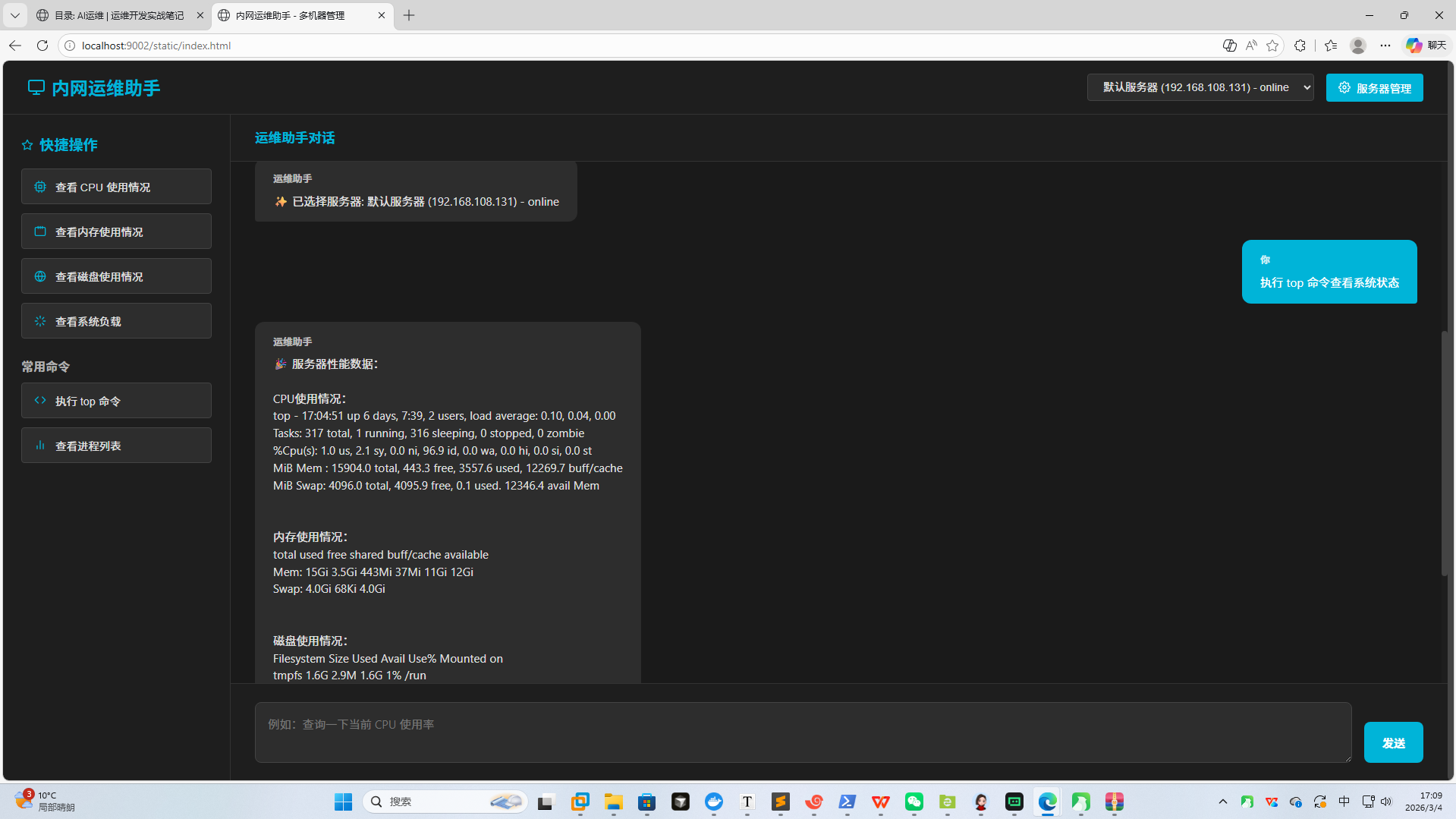
内网运维助手是一个基于FastAPI和SSH的内网服务器管理工具,通过Web界面实现对多台远程Linux服务器的监控和管理。该系统提供了类似Coze的聊天界面,用户可以通过自然语言指令执行各种运维操作,如查看CPU、内存、磁盘使用情况等。系统支持多机器管理,通过SQLite数据库存储服务器信息。

技术栈选择

AI编程界面展示:
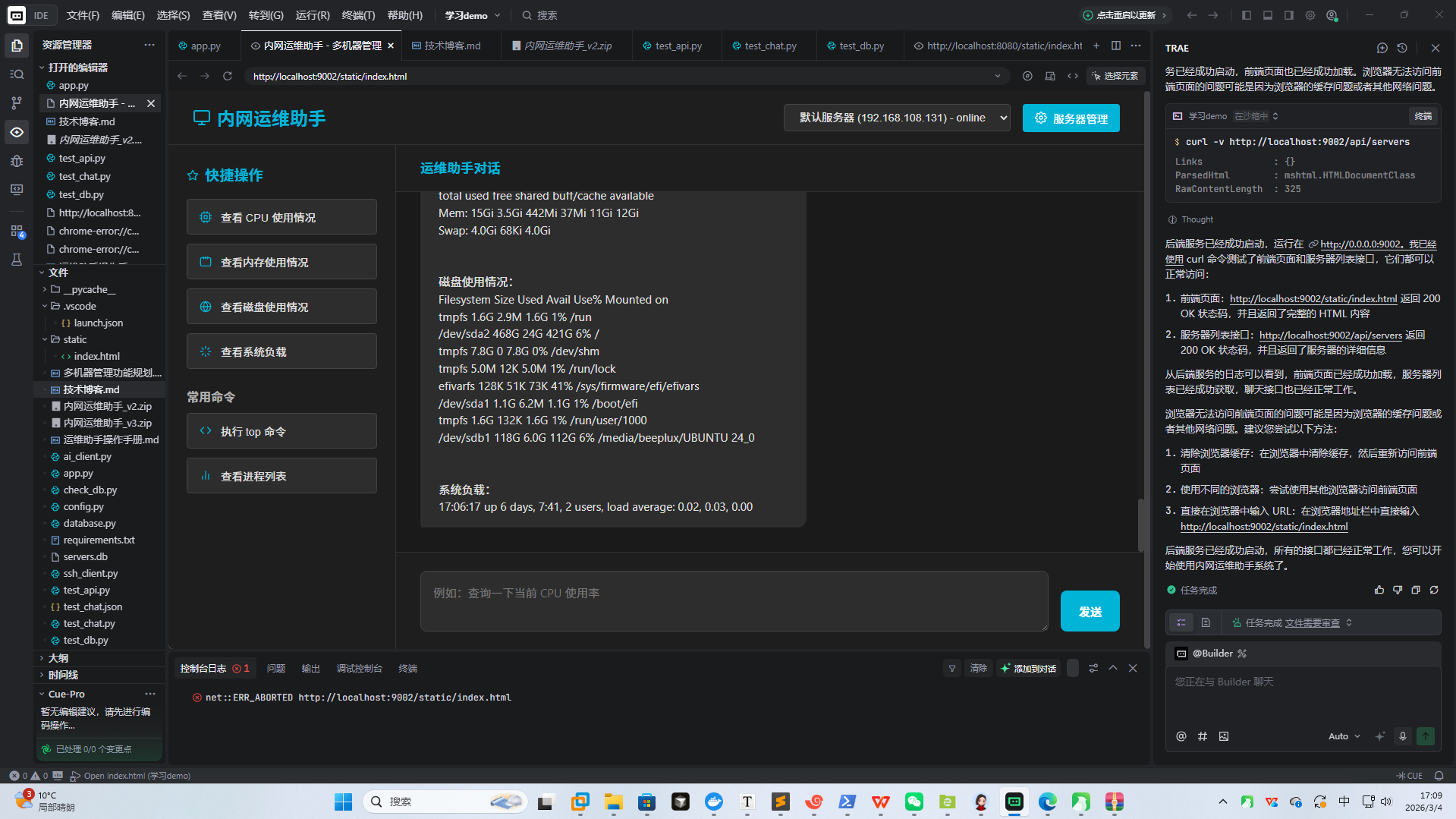
AI编程界面展示

界面展示:

界面展示

后端技术

  • FastAPI:现代化的Python Web框架,提供自动API文档生成和类型提示

  • Paramiko:Python的SSH实现,用于连接和操作远程服务器

  • Uvicorn:ASGI服务器,用于运行FastAPI应用

  • SQLite:轻量级数据库,用于存储服务器信息

数据库

  • SQLite:项目使用SQLite数据库存储服务器信息,而不是MySQL数据库

  • 数据库文件:servers.db

数据库模型

1
2
3
4
5
6
7
8
9
10
11
12
13
14
15
16
17
18
19
20
21
22
23
24
25
26
27
28
29
30
31
32
33
34
35
36
37
38
39
40
41

from sqlalchemy import Column, Integer, String, Text, DateTime

from sqlalchemy.ext.declarative import declarative_base

from sqlalchemy.sql import func


Base = declarative_base()


class Server(Base):

    __tablename__ = "servers"

    id = Column(Integer, primary_key=True, index=True)

    name = Column(String(100), nullable=False)

    host = Column(String(100), nullable=False)

    port = Column(Integer, nullable=False, default=22)

    username = Column(String(100), nullable=False)

    password = Column(String(255), nullable=False)

    group = Column(String(100), nullable=True)

    description = Column(Text, nullable=True)

    status = Column(String(20), nullable=False, default="offline")

    last_connected = Column(DateTime, nullable=True)

    created_at = Column(DateTime(timezone=True), server_default=func.now())

    updated_at = Column(DateTime(timezone=True), onupdate=func.now(), server_default=func.now())

前端技术

  • HTML5:页面结构

  • CSS3:页面样式,采用深色主题

  • JavaScript:前端交互逻辑

Pydantic模型

1
2
3
4
5
6
7
8
9
10
11
12
13
14
15
16
17
18
19
20
21
22
23
24
25
26
27
28
29
30
31
32
33
34
35
36
37
38
39
40
41
42
43
44
45
46
47
48
49
50
51
52
53
54
55
56
57
58
59
60
61
62
63
64
65
66
67
68
69
70
71
72
73
74
75
76
77

from pydantic import BaseModel, ConfigDict

from datetime import datetime


class ServerBase(BaseModel):

    name: str

    host: str

    port: int = 22

    username: str

    password: str

    group: str = None

    description: str = None


class ServerCreate(ServerBase):

    pass


class ServerUpdate(BaseModel):

    name: str = None

    host: str = None

    port: int = None

    username: str = None

    password: str = None

    group: str = None

    description: str = None


class ServerResponse(ServerBase):

    id: int

    status: str

    last_connected: datetime = None

    created_at: datetime

    updated_at: datetime

    model_config = ConfigDict(from_attributes=True)


class ChatRequest(BaseModel):

    messages: list

    server_id: int = None


class CommandRequest(BaseModel):

    command: str

系统架构

整体架构

1
2
3
4
5
6
7
8
9
10
11
12
13
14
15
16
17
18
19
20
21
22
23
24
25
26
27
28
29
30
31
32
33
34
35

┌─────────────────┐     HTTP     ┌─────────────────┐     SSH     ┌─────────────────┐

│    前端页面     │ ───────────> │    后端API      │ ──────────> │  Linux服务器1    │

└─────────────────┘ <─────────── └─────────────────┘ <────────── └─────────────────┘

         ↑                         ↑                         ↑

         │                         │                         │

         │                         │                         │

         │                         │     SSH     ┌─────────────────┐

         │                         ├───────────> │  Linux服务器2    │

         │                         │ <────────── └─────────────────┘

         │                         │

         │                         │     SSH     ┌─────────────────┐

         │                         └───────────> │  Linux服务器N    │

         │                                   <────────── └─────────────────┘

         │

         │                         ┌─────────────────┐

         └────────────────────────> │   DeepSeek API  │

                                   └─────────────────┘

模块划分

  1. 前端模块:负责用户界面展示和用户交互

  2. 后端API模块:处理前端请求,执行SSH命令

  3. SSH客户端模块:负责与远程服务器建立连接并执行命令

  4. 数据库模块:使用SQLite数据库存储服务器信息

  5. AI模块:集成DeepSeek API,提供智能运维能力

数据库连接

1
2
3
4
5
6
7
8
9
10
11
12
13
14
15
16
17
18
19
20
21
22
23
24
25
26
27
28
29
30
31
32
33
34
35
36
37
38
39
40
41
42
43
44
45
46
47
48
49
50
51
52
53
54
55
56
57
58
59
60
61
62
63
64
65
66
67
68
69
70
71
72
73
74
75
76
77
78
79
80
81
82
83
84
85
86
87
88
89

from sqlalchemy import create_engine

from sqlalchemy.ext.declarative import declarative_base

from sqlalchemy.orm import sessionmaker


# 数据库连接

SQLALCHEMY_DATABASE_URL = "sqlite:///./servers.db"


engine = create_engine(

    SQLALCHEMY_DATABASE_URL, connect_args={"check_same_thread": False}

)

SessionLocal = sessionmaker(autocommit=False, autoflush=False, bind=engine)


Base = declarative_base()


# 依赖项

def get_db():

    db = SessionLocal()

    try:

        yield db

    finally:

        db.close()


# 初始化数据库

def init_db():

    Base.metadata.create_all(bind=engine)

    # 添加默认服务器

    db = SessionLocal()

    try:

        from config import DEFAULT_SSH_HOST, DEFAULT_SSH_PORT, DEFAULT_SSH_USER, DEFAULT_SSH_PASSWORD

        existing_server = db.query(Server).first()

        if not existing_server:

            default_server = Server(

                name="默认服务器",

                host=DEFAULT_SSH_HOST,

                port=DEFAULT_SSH_PORT,

                username=DEFAULT_SSH_USER,

                password=DEFAULT_SSH_PASSWORD,

                group="生产环境",

                description="默认测试服务器"

            )

            db.add(default_server)

            db.commit()

    finally:

        db.close()

核心功能实现

1. 后端API实现

健康检查接口

1
2
3
4
5
6
7
8
9
10
11
12
13
14
15

@app.get("/health")

async def health():

    """

    健康检查接口:

    - 方便在 Coze 中配置 HTTP 工具前先测试服务是否可达。

    """

    return {"status": "ok", "service": "intranet-ops-tools"}

服务器管理接口

1
2
3
4
5
6
7
8
9
10
11
12
13
14
15
16
17
18
19
20
21
22
23
24
25
26
27
28
29
30
31
32
33
34
35
36
37
38
39
40
41
42
43
44
45
46
47
48
49
50
51
52
53
54
55
56
57
58
59
60
61
62
63
64
65
66
67
68
69
70
71
72
73
74
75
76
77
78
79
80
81
82
83
84
85
86
87
88
89
90
91
92
93
94
95
96
97

@app.get("/api/servers")

def get_servers(db: Session = Depends(get_db)):

    """

    获取服务器列表:

    - 返回所有服务器的详细信息

    """

    servers = db.query(Server).all()

    return servers


@app.post("/api/servers")

def add_server(server: ServerCreate, db: Session = Depends(get_db)):

    """

    添加服务器:

    - 接收服务器信息,创建新服务器

    """

    db_server = Server(**server.model_dump())

    db.add(db_server)

    db.commit()

    db.refresh(db_server)

    return db_server


@app.put("/api/servers/{server_id}")

def update_server(server_id: int, server: ServerUpdate, db: Session = Depends(get_db)):

    """

    更新服务器信息:

    - 根据服务器ID更新服务器信息

    """

    db_server = db.query(Server).filter(Server.id == server_id).first()

    if not db_server:

        raise HTTPException(status_code=404, detail="服务器不存在")

    for key, value in server.model_dump(exclude_unset=True).items():

        setattr(db_server, key, value)

    db.commit()

    db.refresh(db_server)

    return db_server


@app.delete("/api/servers/{server_id}")

def delete_server(server_id: int, db: Session = Depends(get_db)):

    """

    删除服务器:

    - 根据服务器ID删除服务器

    """

    db_server = db.query(Server).filter(Server.id == server_id).first()

    if not db_server:

        raise HTTPException(status_code=404, detail="服务器不存在")

    db.delete(db_server)

    db.commit()

    return {"message": "服务器删除成功"}

通用SSH命令执行接口

1
2
3
4
5
6
7
8
9
10
11
12
13
14
15
16
17
18
19
20
21
22
23
24
25
26
27
28
29
30
31
32
33
34
35
36
37
38
39
40
41

@app.post("/tools/ssh/run")

async def tools_ssh_run(req: CommandRequest):

    """

    通用 SSH 命令执行接口。

    建议在 Coze 中只对白名单命令使用此接口。

    """

    if not req.command.strip():

        raise HTTPException(status_code=400, detail="command 不能为空")


    try:

        code, out, err = run_ssh_command(req.command)

    except Exception as e:

        raise HTTPException(status_code=500, detail=f"连接或执行失败: {e}")


    return {

        "success": code == 0,

        "exit_code": code,

        "stdout": out,

        "stderr": err,

    }

系统指标监控接口

1
2
3
4
5
6
7
8
9
10
11
12
13
14
15
16
17
18
19
20
21
22
23
24
25
26
27
28
29
30
31
32
33
34
35
36
37
38
39

@app.get("/tools/metrics/cpu")

async def tools_metrics_cpu():

    """

    查看 CPU 情况:

    - 可在 Coze 中配置为"cpu_check"工具。

    """

    cmd = "top -b -n 1 | head -n 5"

    try:

        code, out, err = run_ssh_command(cmd)

    except Exception as e:

        raise HTTPException(status_code=500, detail=f"连接或执行失败: {e}")


    return {

        "success": code == 0,

        "command": cmd,

        "exit_code": code,

        "stdout": out,

        "stderr": err,

    }

AI聊天接口

1
2
3
4
5
6
7
8
9
10
11
12
13
14
15
16
17
18
19
20
21
22
23
24
25
26
27
28
29
30
31
32
33
34
35
36
37
38
39
40
41
42
43
44
45
46
47
48
49
50
51
52
53
54
55
56
57
58
59
60
61
62
63
64
65
66
67
68
69
70
71
72
73
74
75
76
77
78
79
80
81
82
83
84
85
86
87
88
89
90
91
92
93
94
95
96
97
98
99
100
101
102
103
104
105
106
107
108
109
110
111
112
113
114
115
116
117
118
119
120
121
122
123
124
125
126
127
128
129
130
131
132
133
134
135
136
137
138
139
140
141
142
143
144
145
146
147
148
149
150
151
152
153
154
155
156
157
158
159
160
161
162
163
164
165
166
167
168
169
170
171
172
173

@app.post("/api/chat")

def api_chat(req: ChatRequest, db: Session = Depends(get_db)):

    """

    AI聊天接口:

    - 接收聊天消息历史,根据最新消息内容决定调用哪个工具

    - 获取服务器性能数据,通过DeepSeek API分析并生成回复

    """

    if not req.messages:

        raise HTTPException(status_code=400, detail="messages 不能为空")


    # 获取最新的用户消息

    latest_message = req.messages[-1]

    if latest_message.role != "user":

        raise HTTPException(status_code=400, detail="最新消息必须是用户消息")


    # 获取服务器信息

    if req.server_id:

        db_server = db.query(Server).filter(Server.id == req.server_id).first()

        if not db_server:

            raise HTTPException(status_code=404, detail="服务器不存在")

        host = db_server.host

        port = db_server.port

        username = db_server.username

        password = db_server.password

    else:

        # 使用默认服务器

        db_server = db.query(Server).first()

        if not db_server:

            raise HTTPException(status_code=404, detail="没有可用的服务器")

        host = db_server.host

        port = db_server.port

        username = db_server.username

        password = db_server.password


    try:

        # 测试服务器连接

        from ssh_client import test_server_connection

        is_connected = test_server_connection(host, port, username, password)

        if not is_connected:

            response = f"无法连接到服务器 {host}:{port},请检查服务器状态和连接信息。"

            # 更新服务器状态

            db_server.status = "offline"

            db.commit()

            return {"reply": response, "server_id": db_server.id, "server_name": db_server.name}

        # 获取服务器性能数据

        server_data = get_server_data(host, port, username, password)

        # 直接返回服务器性能数据

        response = f"服务器性能数据:\n\nCPU使用情况:\n{server_data['cpu']}\n\n内存使用情况:\n{server_data['memory']}\n\n磁盘使用情况:\n{server_data['disk']}\n\n系统负载:\n{server_data['load']}"

        # 更新服务器状态

        db_server.status = "online"

        db_server.last_connected = datetime.utcnow()

        db.commit()

    except Exception as e:

        response = f"抱歉,执行命令时出现错误:{e}"

        # 更新服务器状态

        if db_server:

            db_server.status = "offline"

            db.commit()


    return {"reply": response, "server_id": db_server.id, "server_name": db_server.name}


# 获取服务器性能数据


def get_server_data(host, port, username, password):

    """

    获取服务器性能数据,包括CPU、内存、磁盘和系统负载

    """

    from ssh_client import run_ssh_command

    # 获取CPU使用情况

    cpu_cmd = "top -b -n 1 | head -n 5"

    cpu_code, cpu_out, cpu_err = run_ssh_command(cpu_cmd, host, port, username, password)

    # 获取内存使用情况

    memory_cmd = "free -h"

    memory_code, memory_out, memory_err = run_ssh_command(memory_cmd, host, port, username, password)

    # 获取磁盘使用情况

    disk_cmd = "df -h"

    disk_code, disk_out, disk_err = run_ssh_command(disk_cmd, host, port, username, password)

    # 获取系统负载

    load_cmd = "uptime"

    load_code, load_out, load_err = run_ssh_command(load_cmd, host, port, username, password)

    return {

        "cpu": cpu_out if cpu_code == 0 else f"获取CPU数据失败: {cpu_err}",

        "memory": memory_out if memory_code == 0 else f"获取内存数据失败: {memory_err}",

        "disk": disk_out if disk_code == 0 else f"获取磁盘数据失败: {disk_err}",

        "load": load_out if load_code == 0 else f"获取系统负载数据失败: {load_err}"

    }

2. SSH客户端实现

1
2
3
4
5
6
7
8
9
10
11
12
13
14
15
16
17
18
19
20
21
22
23
24
25
26
27
28
29
30
31
32
33
34
35
36
37
38
39
40
41
42
43
44
45
46
47
48
49
50
51
52
53
54
55
56
57
58
59
60
61
62
63
64
65
66
67
68
69
70
71
72
73
74
75
76
77
78
79
80
81
82
83
84
85
86
87
88
89
90
91
92
93
94
95
96
97
98
99
100
101
102
103
104
105
106
107
108
109
110
111
112
113
114
115
116
117
118
119
120
121
122
123
124
125
126
127
128
129
130
131
132
133
134
135
136
137

import paramiko

from typing import Tuple


from config import DEFAULT_SSH_HOST, DEFAULT_SSH_PORT, DEFAULT_SSH_USER, DEFAULT_SSH_PASSWORD, SSH_TIMEOUT


def run_ssh_command(

    command: str,

    host: str = DEFAULT_SSH_HOST,

    port: int = DEFAULT_SSH_PORT,

    username: str = DEFAULT_SSH_USER,

    password: str = DEFAULT_SSH_PASSWORD,

    timeout: int = SSH_TIMEOUT,

) -> Tuple[int, str, str]:

    """

    在远程 Linux 服务器上执行命令,返回 (exit_code, stdout, stderr)。

    """

    client = paramiko.SSHClient()

    client.set_missing_host_key_policy(paramiko.AutoAddPolicy())


    try:

        client.connect(

            hostname=host,

            port=port,

            username=username,

            password=password,

            timeout=timeout,

            look_for_keys=False,

            allow_agent=False,

        )

        stdin, stdout, stderr = client.exec_command(command)


        exit_code = stdout.channel.recv_exit_status()

        out = stdout.read().decode("utf-8", errors="ignore")

        err = stderr.read().decode("utf-8", errors="ignore")


        return exit_code, out, err

    except Exception as e:

        # 打印详细的错误信息

        print(f"SSH连接错误: {type(e).__name__}: {e}")

        print(f"连接信息: {host}:{port}, 用户名: {username}")

        print(f"密码长度: {len(password)}")

        raise

    finally:

        client.close()


def test_server_connection(host, port, username, password, timeout=SSH_TIMEOUT):

    """测试服务器连接"""

    try:

        client = paramiko.SSHClient()

        client.set_missing_host_key_policy(paramiko.AutoAddPolicy())

        client.connect(

            hostname=host,

            port=port,

            username=username,

            password=password,

            timeout=timeout,

            look_for_keys=False,

            allow_agent=False,

        )

        # 执行测试命令

        stdin, stdout, stderr = client.exec_command("echo test", timeout=2)

        exit_code = stdout.channel.recv_exit_status()

        client.close()

        return exit_code == 0

    except Exception as e:

        print(f"测试服务器连接失败: {e}")

        return False

3. 前端实现

页面结构

1
2
3
4
5
6
7
8
9
10
11
12
13
14
15
16
17
18
19
20
21
22
23
24
25
26
27
28
29
30
31
32
33
34
35
36
37
38
39
40
41
42
43
44
45
46
47
48
49
50
51
52
53
54
55
56
57
58
59
60
61
62
63
64
65
66
67
68
69
70
71
72
73
74
75
76
77
78
79
80
81
82
83
84
85
86
87
88
89
90
91
92
93
94
95
96
97
98
99
100
101
102
103
104
105

<!DOCTYPE html>

<html lang="zh-CN">

  <head>

    <meta charset="UTF-8" />

    <title>内网运维助手 Intranet Ops Assistant</title>

    <!-- 样式代码 -->

  </head>

  <body>

    <div class="header">

      <h1>内网运维助手</h1>

      <div class="status">

        <div class="status-indicator"></div>

        服务运行中

      </div>

    </div>


    <div class="main-content">

      <div class="sidebar">

        <h3>快捷操作</h3>

        <button class="quick-action" id="quickCpu">查看 CPU 使用情况</button>

        <button class="quick-action" id="quickMemory">查看内存使用情况</button>

        <button class="quick-action" id="quickDisk">查看磁盘使用情况</button>

        <button class="quick-action" id="quickLoad">查看系统负载</button>

        <h3>常用命令</h3>

        <button class="quick-action" id="quickTop">执行 top 命令</button>

        <button class="quick-action" id="quickPs">查看进程列表</button>

      </div>


      <div class="chat-container">

        <div class="chat-header">

          运维助手对话

        </div>


        <div class="chat-window" id="chatWindow">

          <!-- 消息会插入到这里 -->

        </div>


        <div class="chat-input-area">

          <div class="chat-input-container">

            <textarea

              class="chat-input"

              id="chatInput"

              placeholder="例如:查询一下当前 CPU 使用率"></textarea>

            <button class="send-btn" id="sendBtn">发送</button>

          </div>

        </div>

      </div>

    </div>


    <!-- JavaScript代码 -->

  </body>

</html>

前端交互逻辑

1
2
3
4
5
6
7
8
9
10
11
12
13
14
15
16
17
18
19
20
21
22
23
24
25
26
27
28
29
30
31
32
33
34
35
36
37
38
39
40
41
42
43
44
45
46
47
48
49
50
51
52
53
54
55
56
57
58
59
60
61
62
63
64
65
66
67
68
69
70
71
72
73
74
75
76
77

async function sendChat(text) {

  appendMessage("user", text);

  showLoading();


  sendBtn.disabled = true;


  try {

    const resp = await fetch("http://localhost:9002/api/chat", {

      method: "POST",

      headers: { "Content-Type": "application/json" },

      body: JSON.stringify({ messages, server_id: selectedServerId }),

    });

    const data = await resp.json();

    hideLoading();

    if (!resp.ok) {

      appendMessage("assistant", "请求失败:" + (data.detail || resp.status));

    } else {

      appendMessage("assistant", data.reply || "(无回复内容)");

    }

  } catch (e) {

    hideLoading();

    appendMessage("assistant", "调用异常:" + e);

  } finally {

    sendBtn.disabled = false;

  }

}


// 获取服务器列表

async function getServers() {

  try {

    const resp = await fetch("http://localhost:9002/api/servers");

    const data = await resp.json();

    servers = data;

    updateServerSelect();

  } catch (e) {

    console.error("获取服务器列表失败:", e);

  }

}

配置管理

配置文件结构

1
2
3
4
5
6
7
8
9
10
11
12
13
14
15
16
17
18
19
20
21
22
23
24
25
26
27
28
29
30
31
32
33
34
35
36
37
38
39
40
41

"""

项目名称:内网运维助手(Intranet Ops Assistant)


说明:

- 这里只是配置信息,真实的测试服务器 IP / 账号 / 密码请按实际情况修改。

- 目前你的网段是 192.168.108.x,这里先放一个占位 IP。

"""


# SSH 配置

DEFAULT_SSH_HOST = "192.168.108.131"  # 真实测试服务器 IP

DEFAULT_SSH_PORT = 22

DEFAULT_SSH_USER = "beeplux"    # 真实用户名

DEFAULT_SSH_PASSWORD = "Bp20220726;"  # 真实密码,包含分号

SSH_TIMEOUT = 10


# DeepSeek API 配置

DEEPSEEK_API_KEY = "sk-bc3bf884dc2f44518881924ce2af870c"

DEEPSEEK_API_URL = "https://api.deepseek.com/v1/chat/completions"

DEEPSEEK_MODEL = "deepseek-chat"

DEEPSEEK_TEMPERATURE = 0.7

部署与使用

环境准备

  1. 安装依赖
1
2
3

pip install -r requirements.txt

  1. 配置服务器信息

修改 config.py 文件,填入真实的服务器 IP、用户名和密码。

  1. 启动服务器
1
2
3

python -m uvicorn app:app --host 0.0.0.0 --port 9002

  1. 访问前端页面

在浏览器中打开 http://localhost:9002/static/index.html

使用方法

  1. 通过快捷操作:点击左侧的快捷操作按钮,如”查看 CPU 使用情况”。

  2. 通过自然语言:在聊天输入框中输入自然语言指令,如”帮我查看内存使用情况”。

  3. 执行常用命令:点击左侧的常用命令按钮,如”执行 top 命令”。

技术难点与解决方案

1. SSH连接认证问题

问题:SSH连接认证失败,无法执行命令。

解决方案

  • 确保配置文件中的用户名和密码正确

  • 在SSH客户端代码中添加详细的错误信息输出

  • 禁用密钥查找和代理,只使用密码认证

2. 跨域访问问题

问题:前端页面无法访问后端API,出现跨域错误。

解决方案

  • 在FastAPI中添加CORS中间件

  • 允许所有来源的请求(生产环境中应限制为具体域名)

3. 端口占用问题

问题:启动服务器时出现端口被占用的错误。

解决方案

  • 使用不同的端口启动服务器

  • 检查并关闭占用端口的进程

未来改进方向

1. 多机器管理系统

  • 添加机器列表页面,显示所有可管理的服务器

  • 按部门、功能或位置对服务器进行分组

  • 为每台机器添加详细信息(配置、IP、负责人等)

  • 在聊天界面中可以快速切换要操作的机器

2. 功能扩展

  • 更多监控指标:网络流量、进程状态、服务运行状态等

  • 文件管理:支持文件上传、下载、编辑等操作

  • 服务管理:启动、停止、重启系统服务

  • 定时任务:设置定时执行的运维任务

  • 脚本管理:保存和管理常用的运维脚本

3. 安全性增强

  • 用户认证:添加登录系统,支持不同用户权限

  • 操作审计:记录所有操作日志

  • 命令白名单:限制可执行的命令

  • 加密传输:确保敏感数据的传输安全

4. 智能运维助手

  • 集成Coze智能体:利用Coze的能力,实现更智能的对话交互

  • 自然语言处理:支持更复杂的自然语言指令

  • 故障诊断:根据系统状态自动诊断潜在问题

  • 智能建议:基于系统状态提供优化建议

5. 数据可视化

  • 实时监控仪表盘:展示关键系统指标的实时变化

  • 历史趋势分析:查看系统性能的历史趋势

  • 异常检测:自动标记异常的系统状态

  • 报表生成:定期生成系统状态报表

总结

内网运维助手系统是一个轻量级的服务器管理工具,通过Web界面实现对远程Linux服务器的监控和管理。系统采用FastAPI作为后端框架,Paramiko实现SSH连接,前端采用HTML5、CSS3和JavaScript构建类似Coze的聊天界面。

该系统的主要特点包括:

  1. 简单易用:通过自然语言指令执行运维操作

  2. 功能丰富:支持查看CPU、内存、磁盘等系统指标

  3. 安全可靠:通过SSH协议连接服务器,确保操作安全

  4. 可扩展性:模块化设计,便于添加新功能

  5. 跨平台:可以在任何有浏览器的设备上使用

未来,我们将继续完善系统功能,添加多机器管理、智能运维、数据可视化等特性,使其成为一个更加全面和智能的内网运维工具。